Why register your products
Protect your investment
Track your proof of ownership
Locate your serial numbers
You can find extra information on where to find your product's serial numbers in the attachment below.
The Classified handlebar unit, smart thru axle and Powershift hub are labelled with a silver sticker, on which the serial number is printed. It is the number indicated with S/N: xxxxxxx. Below we explain the location of the serial numbers on the different components and how to remove the components from your bike to be able to check the numbers.
1. Location of the serial numbers
1.1 Powershift hub label
1.2 Drop bar handle bar unit label
1.3 Ringshifter label
1.4 Smart thru axle label
2. How to remove the components from the bike
2.1 Remove the Powershift hub from the wheel
a) Shift the Powershift hub to the 1:1 ratio and shift the cassette to the smallest sprocket using the rear derailleur.
b) Remove the wheel from the bicycle as you would remove any traditional wheel by removing the smart thru axle.
- Declutch the rear derailleur by setting the clutch to off.
- Turn the smart thru axle anti-clockwise (1).
- Pull the smart thru axle out of the wheel (2).
- Push the rear derailleur backwards and carefully remove the wheel from the bicycle (3).
c) Remove the end cap (6) on the side of the brake disc.
d) Unscrew the hubshell lock ring (7) using the lock ring tool.
e) Pull the Powershift hub (8) out of the hubshell. Classified Serial numbers 3
f) You can find the serial number on the hub. It is indicated with S/N:
g) To reinstall the hub, place the Powershift hub into the hubshell and complete the installation in the reverse order of removal. The recommended hubshell lock ring tightening torque is minimum 30 Nm and maximum 40 Nm.
h) Reinstall the end cap on the disc brake side.
i) Carefully install the wheel in the bicycle.
j) Install the smart thru axle, ensuring that the thru axle lever points towards the handlebar unit. Make sure not to overtighten the smart thru axle. We advise to tighten to 15 Nm, meaning hand tight.
2.2 Remove the drop bar handle bar unit
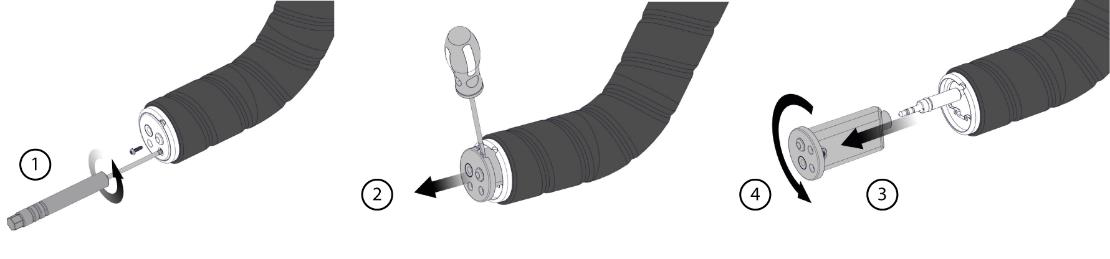
You can check the dropbar handlebar unit's serial number without removing the tape from your handlebar.
a) Loosen the two Torx T5 screws on the dropbar handlebar unit.
b) Pry the handlebar unit from the dropbar handlebar unit using a flat-head screwdriver. If required, you can lightly squeeze the edges of the holder in the handlebar to facilitate removing the dropbar handlebar unit.
c) You can find the serial number on the sticker. It is indicated with S/N:
d) Reinstall all parts in the reverse order of removal. Pay special attention to the following:
- Ensure that the rubber seal between the battery holder and the housing is installed correctly in the groove. You can add some additional
- Install the connector fully up against the handlebar unit. Before continuing the installation, check that the LED blinks both when shifting up and when shifting down.
2.3 Check the ring shifter serial number
The ringshifter slides over the handle bar. To be able to see the serial number on the ringshifter you have to remove the grip from your handle bar.
2.4 Check the thru axle serial number
a) Remove the smart thru axle from the wheel by turning it counter clockwise.
b) You can find the serial number sticker on the back of the lever.
c) Install the smart thru axle again, ensuring that the thru axle lever points towards the handlebar unit. Make sure not to overtighten the smart thru axle. We advise to tighten to 15 Nm, meaning hand tight.
Related to